|
||||||||||||||
Yaba Sanshiro Gets Save Converter, Makeover on AndroidThe developer of Saturn emulator Yaba Sanshiro debuted an online tool this week for converting other emulators’ save files to a format his software can use. It follows an update to the Android version’s user interface earlier this month that was developed using an AI tool. Shinya “DevMiyax” Miyamoto posted about the save conversion tool Tuesday on his Discord server along with a video demonstrating how it works. It allows users who are logged in to an account they’ve made through Yaba Sanshiro on Android or iOS to upload save files from the Mednafen and SSF emulators and convert them to Yaba Sanshiro’s format. Unfortunately, it’s not available to those without an account. That’s because a major feature is that it’s a synchronized cloud save system. The save files that users upload are stored in the cloud and can be imported to any iteration of the emulator while logged in. “To securely access and synchronize your save data, authentication is necessary,” DevMiyax told SHIRO!. They also can be downloaded from the website in .YSBAK format, which is used by the mobile device versions of Yaba Sanshiro. They’re incompatible with the Windows version, though, as that uses .JSON save files. Users will have to log in to their accounts and import save files from the cloud to use them with the Windows version. UI updateEarlier this month, DevMiyax released version 1.19.3 for the Android version of Yaba Sanshiro. It features an overhaul of the user interface. The full feature list entails:
He posted a YouTube video two weeks ago to show off the new interface. The mobile UI was last updated in April 2025 . That update made it easier to search for games and added the ability to rate them within the app. 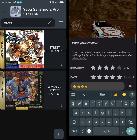 Above is Yaba Sanshiro’s previous UI. Below is its new UI.
 The free Android version is here while the paid “Pro” version, which adds some extra features for US$5, is here . The iOS versions haven’t been updated since early January and don’t yet feature the UI overhaul. The free iOS version is here while the paid iOS version is here . Dabbling with AIAccording to a blog post on the official site, DevMiyax said the Android version’s UI overhaul was created using an agentic AI tool called Claude. “Recently, AI coding tools like Cursor, Windsurf, AugmentCode, and GitHub Copilot have become common,” DevMiyax wrote in the blog post dated Feb. 5. “I tried them, of course. But honestly, I didn’t enjoy using them very much. It was hard to communicate intent. They often didn’t do exactly what I asked, and sometimes did things I didn’t want at all. Using them often felt more stressful than helpful.” He said that perception changed when he used Claude Code and Opus 4.5 , saying they “actually understand what you mean.” “The most impressive moment for me was when I said, ‘Run it and check the logs,'” he said. “It built the app, installed it, launched it, read the logs, and fixed the issue in one continuous flow.” The blog post concluded with DevMiyax rhetorically asking himself whether the software is still “his” if he’s using AI to create it. “Early computers were programmed by wiring. Then came punch cards, assembly language, compilers, and GUIs. The way we turn ideas into software has always become more efficient over time. This is just another step in that same direction. Humans still decide what to build. Humans still use the software. Only the tools in between have changed. Right now, I’m just enjoying building software with those new tools.” — DevMiyaxHe isn’t using Claude for the emulation code itself, though. “So far, Claude has only been used for the UI and some Vulkan-related code,” DevMiyax told SHIRO!. “When we tried using it on the emulation core, it broke things pretty badly. So the core is still hand-maintained for now.” Yaba Sanshiro began development in 2014 as a fork of Yabause , an emulator that is no longer actively worked on, to bring it to Android devices. A PC version was released later that’s been occasionally updated alongside the Android version — most recently, it was updated in February 2025 . Its name was changed to Yaba Sanshiro 2 in April 2021 after Google blacklisted the original app for including Action Replay cheats. The emulator wasn’t approved for the Apple App Store until August 2024 when Apple changed its policy regarding game emulators.
|
||||||||||||||