|
||||||||||||||
Investigating the Alleged Mouse Support in Digital Pinball: Last GladiatorsHere on SHIRO!, our friend Bo Bayles discovers long-lost secrets in Saturn games on a weekly basis in his Under the Microscope series . But this time, it’s my turn to make a discovery — minor though it may be. I was scrolling through a Bluesky feed of posts that mention the Sega Saturn over the weekend, as you do, when a post from someone named Boost Mix Music caught my eye. They spotted a feature in Japan’s old Sega Saturn Magazine that claims the shuttle mouse controller is compatible with Digital Pinball: Last Gladiators. Woah apparently the Sega Saturn "shuttle mouse" is compatible with the pinball game Last Gladiators and you can shake the mouse to shake the table?? Can't believe I didn't hear about this before, don't think I have one of these to test it out… — Boost Mix Music – game music remastering (@boostmixmusic.bsky.social) 2026-01-25T03:46:13.300Z“Woah apparently the Sega Saturn ‘shuttle mouse’ is compatible with the pinball game Last Gladiators and you can shake the mouse to shake the table??” Boost Mix Music said. “Can’t believe I didn’t hear about this before, don’t think I have one of these to test it out…” 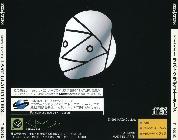 Box art courtesy of Sega Retro. Box art courtesy of Sega Retro.
Well, I do have a mouse to test, but first I checked Sega Retro’s page on Digital Pinball to see if this feature was already known. It indeed does not say that the game supports the mouse, and the back of the Japanese case doesn’t list it, either. (The yellow box in the lower-right corner says it’s a one-player game, its genre is “real simulation” and it supports the memory backup cartridge.) Maybe it was a planned feature that got cut before launch? Wondering when this factoid got published, I searched for the exact issue it came from. Boost Mix Music said they thought it was one of the mid-1995 ones, and I ended up finding it in the October issue of Sega Saturn Magazine, page 89, as part of a larger feature about Saturn’s peripherals. 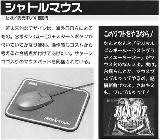
Digital Pinball was first released in Japan in June 1995, so this factoid was published months later. They would have known if it had been cut, right? But it’s not on the box, so why did this magazine write this? The left side of the feature describes the shuttle mouse above a photo of it on a Sega Saturn-branded mousepad. On the right, it says, “ If you want to play this software! Well well, ‘Digital Pinball: Last Gladiators’ is mouse compatible. Really. Rocking the table by giving the mouse a shake-shake feels wonderfully fresh. Go on, you give it a shake-shake too!” So did this feature really make it into the game? Only one way to find out for sure. It was time to test it myself. Hands-on researchI put a normal gamepad in my Saturn’s player one port and the mouse in player two so I could select Digital Pinball from my Satiator optical drive emulator’s game list. Once the game booted, I tried pressing the mouse’s start button to begin the game, and sure enough… It works! I could even navigate the main menu with mouse motion! How cool. But what about actual gameplay? Yep, that works, too. The A button controls the left flipper and the C button controls the right. Shaking the mouse does indeed rock the table — and it doesn’t take much shaking to get a tilt penalty. It doesn’t give any advantage over using a standard gamepad, but it’s an option that would have been fun to know about for the SHIRO! monthly challenge for Digital Pinball back in May 2024. Why they wouldn’t mention this functionality on the back of the game, I don’t know, but it’s there — in the original Japanese version of the game, that is. So what about the North American and PAL versions that released later in 1995? The mouse wasn’t released yet in North America or at all in Europe, so did they remove support for it? 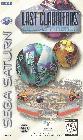
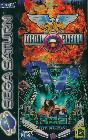 The North American and PAL covers of Digital Pinball: Last Gladiators, courtesy of Sega Retro. One of these is way more awesome than the other.
Nope, they left it in there. I checked both non-Japanese versions and they work just the same. What about the Japan-only 1997 update to Last Gladiators? Yeah, the mouse works the same way in that one, too. Nice. 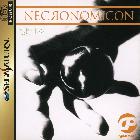 Box art courtesy of Sega Retro. Box art courtesy of Sega Retro.
Alright, so there’s one more Digital Pinball game to test: Necronomicon, the proper sequel that developer Kaze released in November 1996. This is a different game entirely from the various iterations of Last Gladiators, so did they keep the mouse support in this one? Yes … and no. So sort of! In Necronomicon, the mouse no longer controls the main menu. I had to use the regular gamepad that still was plugged into the player one port to navigate the menu and select a table to play. Pressing the mouse’s start button can’t skip the logos and title screen before the main menu anymore, either. However! The mouse still works during gameplay! A and C control the flippers, start pauses and shaking tilts the table. So for some reason, they removed mouse support from the main menu but left it in for the actual pinballing. Pinballing between controller portsAt that point, I noticed that there was a “2” in the upper-left corner of Necronomicon’s screen, as if it considered me player two when using the mouse. So I wondered: Could I swap it over to the player one port and still use it? 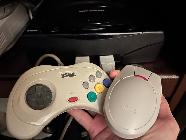 Gotta do it like this. Gotta do it like this.
Nope. The mouse only works in port two. Furthermore, it only works if a regular gamepad is also in port one — if port one is empty, the mouse in port two doesn’t work. So weird! Wait, is it like that in Last Gladiators, too? I had to check. Booting up Last Gladiators with the mouse in port one — or in this case, swapping it quickly into port one after selecting the game from my Satiator’s list — I was able to skip the opening video with the start button and navigate the main menu. But after selecting a table and getting into a game, the game stopped responding to the mouse. I tried swapping the mouse into port two, still nothing. It wasn’t until I inserted a gamepad into port one that the game started working with the mouse in port two. They really programmed it like that. So! If for some reason you want to play one of Kaze’s Saturn pinball games with a mouse, make sure it’s in port two with a standard gamepad in port one. It’s the only way. 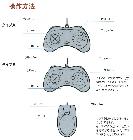
Did you check the manual, Dan?
It’s not mentioned in the North American manual, which makes sense considering the mouse hadn’t been released yet there. But more interestingly, the Necronomicon manual does not mention mouse controls — despite them working during gameplay! And that’s my contribution to the greater curriculum of Sega Saturn research. Japanese players already knew about this decades ago, but like so many pieces of Saturn knowledge that were confined by a language barrier, we in the West were unaware — that is, until one curious soul trawled scans of an old magazine, at least in this case. Thank you to Boost Mix Music for being that curious soul and posting about it! They’ve got a YouTube channel full of remastered video game music, including the Saturn’s Drift King ’97 , so give it a listen.
|
||||||||||||||