|
||||||||||||||
Breathing New Life into GDEMU With openMenu Virtual Folder BundleThe Dreamcast ODE landscape is essentially made up of three options: GDEMU, USB-GDROM, and MODE (I won’t include the IDE mod in this particular conversation). Each arguably brings something special to the table. While the GDEMU quite literally has 100% software compatibility, there have long been certain shortcomings in the user experience that have bothered me (and others). As such, I set out several weeks ago to right these historical wrongs, and thus the new ateam fork of openMenu was born! Over the years, many helpful solutions and improvements have made their way to the GDEMU, like the original gdMenu that swooped in to save us all from having to press the disc-swap button on the PCB itself to cycle to the next disc image. Eventually came openMenu, a fully open source menu system written by mrneo240 (Hayden Kowalchuk). It was new and had its rough edges, but it was the start of something amazing. Eventually others, like megavolt85 and sbstnc , came along to further add to this fantastic open source project. While things improved, I always felt there were core features lacking, especially when compared to almost all other ODEs and flashcarts on the market. It’s always been its 100% compatibility and problem-free experience that’s kept me using it, but I knew GDEMU could be better, if only someone cared enough to roll up their sleeves and do the work… Enter me! What started with a curiosity about setting up sbstnc’s openMenu development container to compile easily without yet another KalistiOS virtual machine turned into a full-fledged re-imagining of both the menu software itself and the accompanying GD MENU Card Manager utility. Admittedly not great at branding or marketing, I came to call this new package the openMenu Virtual Folder Bundle , and it can be downloaded here: https://github.com/DerekPascarella/openMenu-Virtual-Folder-Bundle So, what exactly is different? As a GDEMU user, should you switch to it? To answer the second question, my personal strong opinion is yes . To answer what’s changed, well… the GitHub README contains all of the nitty gritty details, but below I’ve provided a high level list of some of the most important things:
On top of that, this new “Folders” view mode in openMenu is highly themable (explained in the GitHub README). Out of the box, I shipped two flavors, though: list + art, and list only. 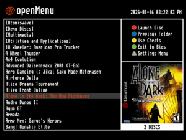
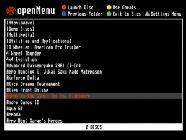
My all-in-one package just hit version 1.1 on Jan. 16 and is now extremely stable and feature-rich. Consult the very detailed documentation in the GitHub README to answer all of your questions! PS: In the future, I hope to simplify the artwork management process, which traditionally has always been seen as a bit cumbersome in the world of openMenu. Stay tuned.
|
||||||||||||||