|
||||||||||||||
Under the Microscope: Yuna RemixIn this edition:
Get the patch from SegaXtreme ! IntroHudson released a special controller for the Saturn to go along with the Saturn Bomberman games — the SBom Joycard: 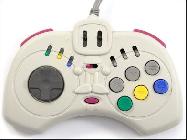 Controller picture from
Sega Retro Controller picture from
Sega Retro
Its key feature is the “repeat” switches, which will automatically fire their associated button. A handful of Hudson games have special features that can be accessed by using these switches:
Add Ginga Ojousama Densetsu Yuna Remix to that list: if you use the Start button switch on the Option screen, you’ll be taken to “Bonus mode.” This was not well-known on the English Internet, but it was sitting right there on the Japanese Wikipedia page for Yuna Remix . Bonus Mode (Requires SBOM JOYCARD):
Connect the SBOM JOYCARD to the 1P port. Upon booting the game, enter the Options menu. Toggle the JOYCARD’s SLOW switch to the Hu- position for at least one second, then flip it back to the NORMAL position for at least one second. A chime will signal that the “Bonus Mode” has been unlocked.
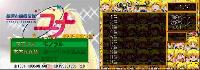 Accessing the Bonus mode by using the SBom controller on the Option screen. Accessing the Bonus mode by using the SBom controller on the Option screen.
Bonus mode lets you play the videos, sounds, and pictures associated with each section of the game. Bonus mode isn’t the only hidden feature in the Yuna Remix : there’s also a graphical debug mode. This one isn’t normally accessible; you have to do some hacking to get into it. It goes beyond the text-based debug features that have been known for a while (see TCRF ):  “Welcome to debug mode. What should we do?” “Welcome to debug mode. What should we do?”
From this menu you can jump to the different scenes of the game, play sounds, select battles, and more. This article will have details on these extra modes and describe the process of making them accessible without special controllers or hacking. For each section of the game, you can access a list of items: Bonus mode
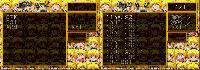 Left: media type selection. Right: An image list. Left: media type selection. Right: An image list.
 Left: one of the SS1 images. Right: a still from one of the CPK videos. Left: one of the SS1 images. Right: a still from one of the CPK videos.
Accessing it : Fortunately, the code that checks for the SBom Joycard controller in this game is almost identical to the code in Saturn Bomberman . The function at 06007bd4 does the checking, and its return value determines whether the 32-bit value at 06058d84 gets set to 1 . The Option screen checks that value. If it’s set, it takes you into bonus mode. So all we have to do is replace that dynamic check with a static read of a 1 . 06010662 e001 Now whenever you open the Option screen, it takes you into Bonus Mode. Debug modeThe high level options are:
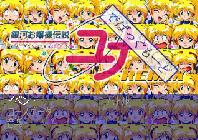
I don’t read Japanese, but it wasn’t hard for me to figure out how to navigate by clicking around. 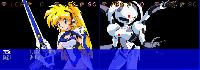 Screenshots from Battle mode. Screenshots from Battle mode.
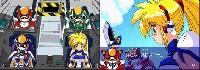 Screenshots from Event and Course mode. Screenshots from Event and Course mode.
Accessing it : as far as I can tell, there’s nothing you can do in the game to unlock this. If the address at 0601074c has a value of 63 when you choose START at the title screen, then it’s enabled. But there’s no apparent way for that address to actually get set to that value. This patch nullifies that check: 06010718 0009 OutroFor more Saturn hacks & cheats, see my archive here at SHIRO!. I’ll be back with more next week. If you like retro game reverse engineering, you may also enjoy my Substack blog , where I cover Dreamcast, PlayStation, PS2, PSP, Nintendo 64, GameCube, and 3DO games as well.
|
||||||||||||||